Privacy is Not a Crime

You often hear people say that they have nothing to hide. Yet these are the same people who will close their blinds and lock their doors. Why do you close your blinds, I thought you said you have nothing to hide.

What would you think if Google showed up at your house, entered without your petmissipn, installed a bunch of video caneras and microphones throughout your house. All without letting you know. Well Google has already done that.

To make matter worse, public discourse has been manipulated so that anybody who insist on keeping their privacy is viewed as a potential criminal. “What, do you have something to hide?”

I don’t trust Google. They view me and my information as the product. And they sell this to advertisers who use it to try and manipulate me into buying their products. Google is trying to hack our psychology in order sell our buying triggers. This is evil.

MapQuest is Right

Donald Trump signed an executive order renaming Lake Ontario to Lake America. Both Google Maps and Apple Maps have now been updated with the new name.

MapQuest is in the news for refusing to rename “Lake Ontario” to “Lake America” on its map. As Valentina Palladino reports, “Since making a strong statement on X, MapQuest’s iOS app has been downloaded ‘hundreds of thousands’ of times and reached the top spot in both the United States and Canadian Apple App Store charts, according to the company.”

Another perk with using MapQuest, the Gulf of Mexico has not been renamed either.

Source:
https://tech.yahoo.com/apps/article/mapquest-is-back-hitting-the-top-of-app-store-charts-after-lake-america-snub-173310991.html

De-Google Firefox

First thing is to change your default search engine to DuckDuckGo. This is found in settings. Change it in both normal browsing and private browsing settings.

But wait, there is another place where Google is hiding – Manage alternative search engines. I changed it to wikipedia.

Under AI Controls I block all AI enhancements. Under data collection I turn off everything and only allow crash reports to be sent only after asking.

Two must have extensions are uBlock Origins (ad blocker) and Privacy Badger (blocks trackers).

De-Google My Life

I was a Google fan for years. But that has changed. Google killed assisysnt and forced Gemini on my phone. It did the ssme on Google search. It is locking down Andoid just like Apple. And the list goes on and on. Bottom line, I am de-googling my life.

First Steps

First two steps was to switch to DuckDuckGo for search and Firefox for my browser. This was not too hard.

Next step was to ditch Gmail. This has turned out to be the hardest. It has been my main email address for everything for over a decade. I switched to Proton mail. This will likely be the last Google service I kill.

I deleted my Google YouTube channel and account. I canceled my premium subscription. I installed NewPipe app from F-Droid.

By the way, Google is currently in the process of eliminating side loading apps using apk files and is now requiring all apt developers to register with Google, a pay $25 fee, and submit a copy of their government ID to Google before they can submit an app to the Play Store. Google wants to owns your phone and tell you what you can do with it – evil.

One Glaring Issue

The glaring issue was that I own a Google Pixel phone running Googles Android operating system. It has Google baked into it.

Google collect information you provide—such as your name, email, phone number, payment details, emails, photos, documents, contacts, and other content—as well as your searches, websites and apps used, YouTube viewing history, voice and audio recordings, purchases, interactions with advertisements, device information, IP address, cookies, browser and app identifiers, crash and performance data, approximate or precise location from GPS, Wi‑Fi, cell towers, Bluetooth, and activity, plus information from public sources, partners, and third-party websites or apps that use Google services such as ads, Analytics, or Maps; when you are signed in, much of this can be associated with your Google Account, while signed-out activity may be linked to unique identifiers tied to your browser, app, or device. Google is a stalker.

GrapheneOS

So I made the radical choice to de-google my phone. I choose GrapheneOS. It is a private and secure mobile operating system with Android app compatibility. Developed as a non-profit open source project.

I used their WebUSB-based installer. I downloaded everything I wanted from my phone, including a screen shot of my apps. I exporter my contacts, my bookmarks, etc.

The install was not hard, but the bare bones of the system was challenging. The system was functional for calls and texting, but that was about it. I eventually has to install a sandboxed Google Play and Sevices to get Android Auto and banking apps.

Just a note, you MUST use compatibility mode (app settings) to get the banking apps to load. Note that Cash App did not work on my GrapheneOS system.

I stall F-Droid but switched to Droidify as my front end. I use Aurora app store for all my apps instead of the Google Play Store (same source but anonymous).

So far the friction has been moderate. It reminds me when I switched to Ubuntu two decades ago. I feel good having a mostly Google free phone.

Links

EFI stub: WARNING: Failed to measure data for event 1: 0x800000000000000b

The warning “EFI stub: WARNING: Failed to measure data for event 1: 0x800000000000000b” during Linux Mint boot is a Secure Boot / kernel‑measurement issue that has been appearing across Mint, Ubuntu, Kubuntu, and SuSE systems since 2023. The good news: your system is not damaged, and the boot continues normally. The warning indicates that the EFI stub attempted to measure boot data for TPM/Secure Boot logging and failed.

The most common and confirmed cause is having too many installed kernels.
Multiple independent reports show the warning disappears immediately after removing old kernels.

Then remove old ones using Update Manager → View → Linux kernels.

How to disable the Jetpack AI features

To fully and permanently disable the Jetpack AI features, you can add the following code snippet to your site using a plugin like Code Snippets:

add_filter( 'jetpack_ai_enabled', '__return_false' );

Once that’s in place, Jetpack AI will be completely disabled across your site.

Linux Mint Update Failed

Failed to fetch http://security.ubuntu.com/ubuntu/pool/main/c/cifs-utils/cifs-utils_7.0-2ubuntu0.3_amd64.deb 404 Not Found [IP: 2606:4700:10::6814:1cf6 80]

How to fix

Update Your Repository List

Run the below command to clean cache and update the list of available packages:

sudo apt clean -y
sudo apt update -y

Then use the Update Manager, reresh it, and try installing again.

This fixed it for me.

How to disable Chrome’s AI model and reclaim your storage

I wouldn’t advise removing the AI model from your computer if you use AI features in Chrome, since on-device models are better for your privacy. However, if you don’t intend to use any AI features within Chrome, you can consider removing the AI model.

To permanently remove the file and stop Chrome from hoarding your storage, you must first tell the browser to stop fetching the model, and then delete the files.

Step 1: Disable the Chrome Flags

  1. Open Google Chrome, type chrome://flags into your URL address bar, and press the Enter key on your keyboard.
  2. In the search bar at the top, search for “optimization-guide-on-device-model.”
  3. When the #optimization-guide-on-device-model flag appears, click the dropdown menu on the right and select “Disabled.”
  4. Search and disable “#prompt-api-for-gemini-nano” too.
  5. Click the Relaunch button that appears at the bottom of the screen to restart Chrome.

This stops Chrome from using the feature, preventing forced auto-downloads when you delete the files.

Step 2: Delete the Folder

Now that Chrome is blocked from retrieving the file, you can safely delete the bloated folder. Make sure Chrome is fully closed before doing this.

  • On Windows:
    • Press Win + R.
    • Paste %LOCALAPPDATA%\Google\Chrome\User Data\ and hit the Enter key on your keyboard.
    • Look through the “Default” folder (or your specific user profile folder) for the “OptGuideOnDeviceModel” folder.
    • Delete it.
  • On macOS:
    • Open Finder.
    • Press Cmd + Shift + G.
    • Paste ~/Library/Application Support/Google/Chrome/ and hit the Enter key on your keyboard.
    • Search for the “OptGuideOnDeviceModel” folder and move it to the trash.
    • Empty your trash bin.

There’s a chance a future Chrome update will reset these flags and redownload the AI model. There are registry changes you can make to prevent this from happening, but that is outside the scope for most users. The easier, non-nuclear option would be to repeat these steps again.

Source: https://www.androidauthority.com/google-chrome-weights-bin-ai-model-download-explained-3664043/

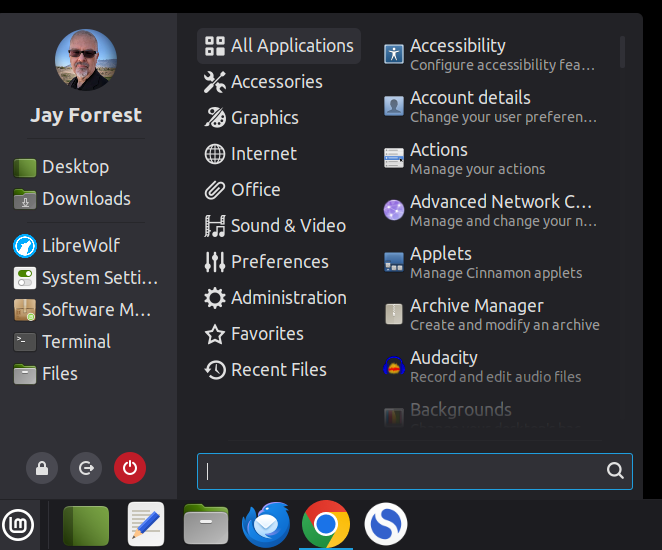
Linux Mint 22.3 Menu Sucks

In one of the first disappointments with Linux Mint, their new menu sucks. It doesn’t look good. It is functional, but ugly.

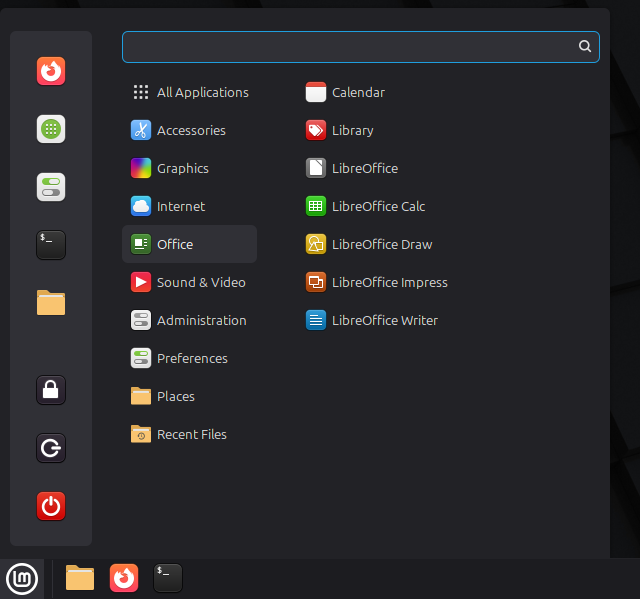
The Old Menu

The original was much better!

Three Free WordPress Security Plugins

WordPress sites are under attack all the time. I have found three free plugins that help me protect my WordPress website. I add a fourth bonus plugin.

The first is “Wordfence Security.” It is an does basic monitoring, blocking, and anti-virus, Firewall and Malware Scan.
https://www.wordfence.com/

Second is “Hide My WP Ghost Lite.” This hides WP CMS, 7G/8G Firewall, Brute Force Protection, 2FA, GEO Security, Temporary Logins, Alerts & more.
https://hidemywpghost.com/.

Third is “IP2Location Country Blocker.” Block visitors from accessing your website or admin area by their country.
https://www.ip2location.com/

Fourth, is “JetPack.” In setting under the Security tab I enable Firewall and Brute force protection. I use the plugin for other reasons, so it is not essential for security.
https://jetpack.com/